
The purpose of this section is to provide your network team with the servers, ports and protocols that need to be enabled through your network infrastructure to allow the Embrava Desk Sign to successfully communicate with the Embrava Device Management System (DMS).
The following section illustrates the order in which these servers are accessed by the Desk Sign.
| # | Address | Port | Protocol | Direction |
|---|---|---|---|---|
| 1 | deskmanagement.azurewebsites.net | 443 | HTTPS | Outbound |
| 2 | eusfuncapp01.azurewebsites.net | 443 | HTTPS | Outbound |
| 3 | north-america.pool.ntp.org | 123 | NTP | Outbound |
| 4 | eushub01.azure-devices.net | 443 | HTTPS | Outbound |
| 5 | eushub01.azure-devices.net | 8883 | MQTT | Outbound |
The purpose of this section is to illustrate the steps the Desk Sign utilizes to boot up and display the availability of a workspace.
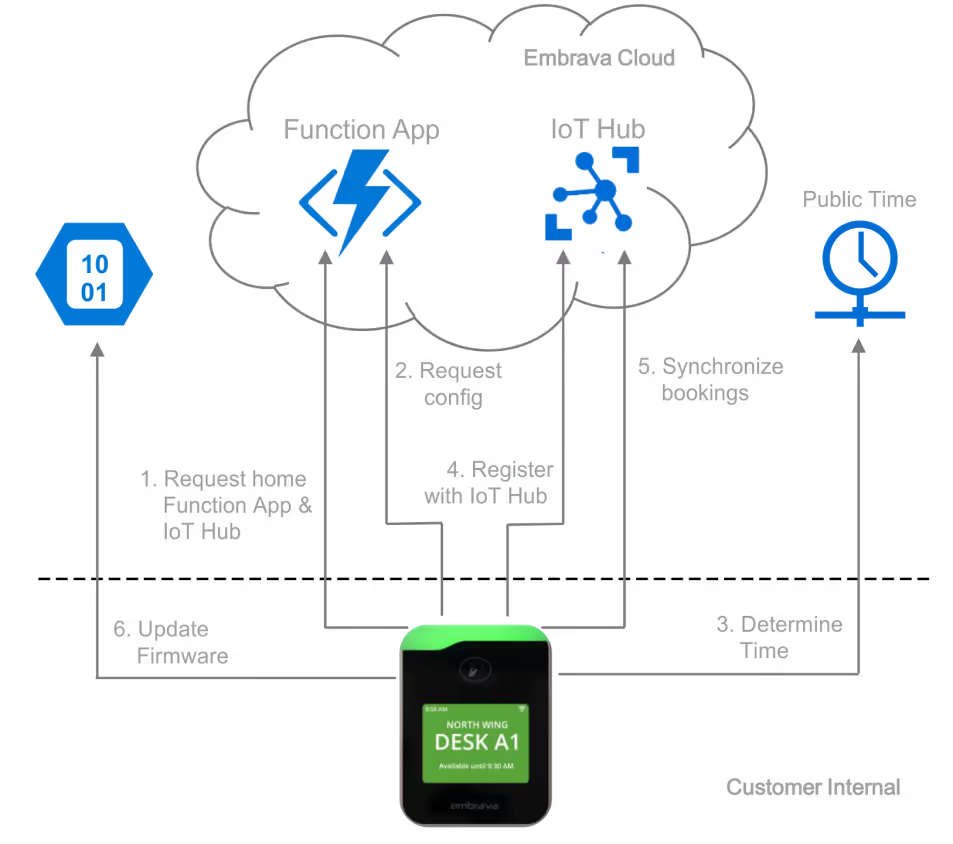
https://deskmanagement.azurewebsites.net/ on port 443 (TCP).https://eusfuncapp01.azurewebsites.net/ on port 443 (TCP).north-america.pool.ntp.org on port 123 (UDP).https://eushub01.azure-devices.net on port 443 (TCP).eushub01.azure-devices.net using the MQTT protocol on port 8883 (TCP).