
Reserve or check in with one tap.
A networked touch panel for hot-desking and hybrid offices. Employees tap an RFID badge, an NFC phone, or the screen itself to claim a workspace. The display shows the booking, holds the desk while you step away, and releases it when you check out. No app to open, no learning curve.
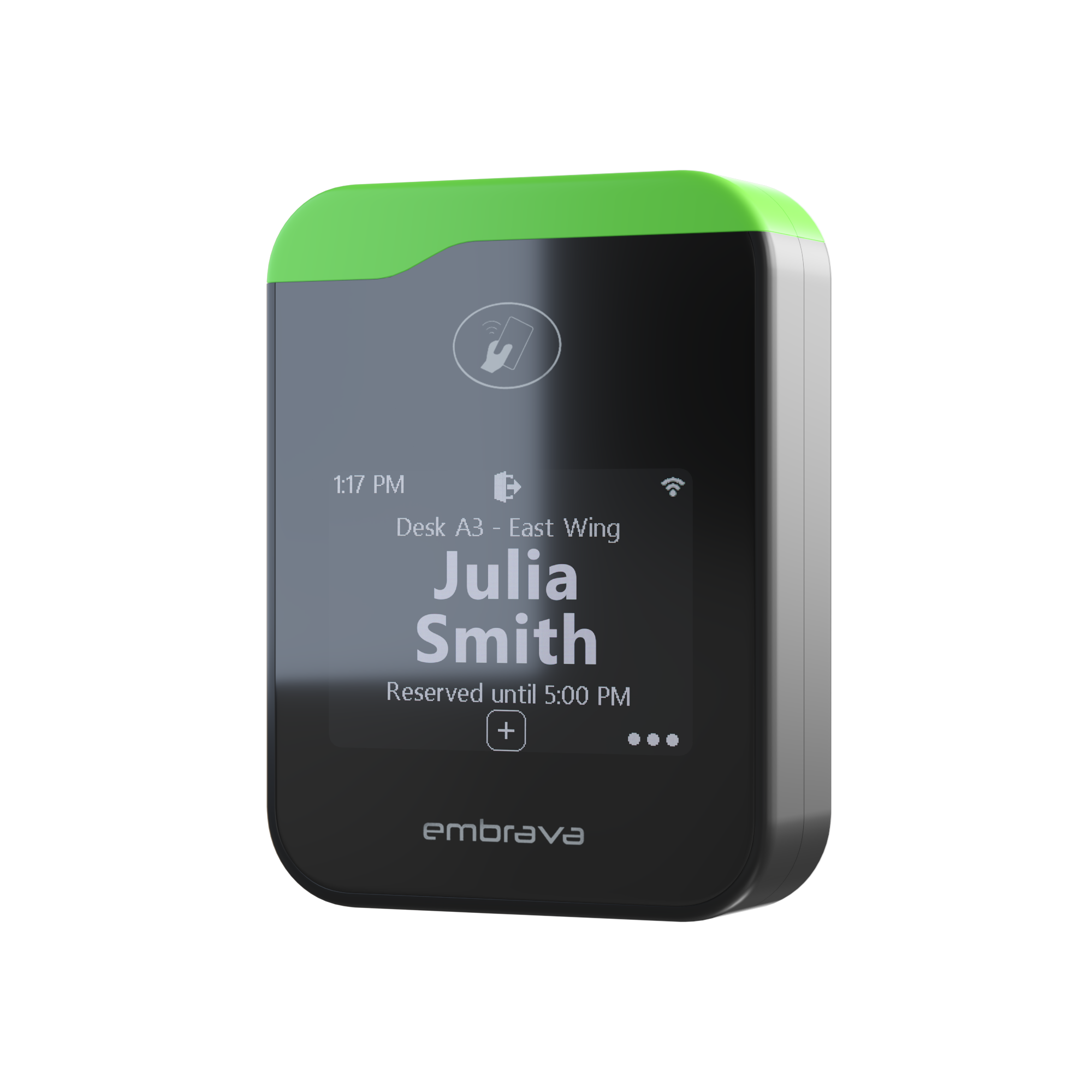
A Desk Sign is a small networked display that sits on a hot desk and shows whether it's free, reserved, or in use. Employees claim the desk by tapping an RFID badge, an NFC phone, a QR code on their screen, or the panel itself. The reservation flows straight to your workplace booking platform, so the floor plan, the desk, and the calendar all stay in sync without a second app to open.
The modern office reality is hot-desking. People rotate between days at home, days at HQ, and days at a satellite floor, and the desk in front of them changes every time. Without a sign on every desk, the floor turns into a parking lot: people guess, they wander, they squat on the wrong booking, and the analytics underneath turn into noise. Desk Sign makes the floor self-service, and makes utilization data trustworthy in the same step.
Every panel runs on Wi-Fi or PoE Ethernet and integrates with the workplace booking platform you already run, including Microsoft Places, Robin, Eptura, ServiceNow, OfficeSpace, Envoy, Appspace, IBM Tririga, Skedda, and others. No middleware, no rip-and-replace, no parallel calendar to keep clean. The mount range covers partitions, desk edges, glass surfaces, and screw-down installs, so the same product fits a startup floor, a Fortune 500 fit-out, or a coworking neighborhood without a custom SKU.
Find and claim a desk without guessing or wandering.
No training needed. Tap your badge, that's it. Zero learning curve.
Every desk, every person, every day. Accounted for by name.
Real utilization data to inform real estate decisions.
Physical hardware drives engagement with digital tools.
One consistent system across every desk in your office.
of employees say Desk Sign reduces anxiety about coming into the office.
Workplace anxiety in 2026 isn't about the commute, it's about not knowing where you'll sit, who you'll see, or whether your team is even in. Desk Sign turns the floor from a parking lot into a neighborhood.
Tap your badge or phone on the panel's NFC target. The desk knows who you are in under 200ms.
The display shows your name, your booking window, and the time it auto-releases. No app, no QR scan.
Coffee, lunch, a meeting, your space is held even when you leave or step away.
Check out of the desk and the next person walks up and starts again. The calendar updates instantly.
Desk Sign plugs into the room-booking and workplace platforms you already run. Seamless integration, easy implementation, no rip-and-replace, no middleware, no new credentials.
See the full ecosystem →Industrial-grade, removable. Holds on glass, metal, laminate, painted wood. Default for most rollouts, clean look, no drilling.
Adhesive plate goes on the desk; the panel snaps on. Pop it off for cleaning, conferences, or moves. Best for hot-desk neighborhoods.
Weighted aluminum base. No adhesive, no install. Perfect for executive desks, coworking, or pilots before you commit to a layout.
A desk booking display is a small networked touch panel that sits on a hot desk and shows whether it's free, reserved, or in use. Employees claim the desk by tapping an RFID badge, an NFC phone, a QR code, or the screen itself. The panel talks to your workplace booking system in real time, so the floor plan, the desk, and the calendar all stay in sync.
Yes. Desk Sign is built to plug into Microsoft Places without middleware or rip-and-replace. Bookings made in Places appear on the panel; check-ins on the panel feed back to Places. The same model applies to Robin, Eptura, ServiceNow, OfficeSpace, Envoy, IBM Tririga, Skedda, and the rest of the workplace booking ecosystem.
Yes. Desk reservations live in your calendar, so Desk Sign reads them from Microsoft 365 and Exchange through the Embrava platform, and it integrates with Microsoft Places, the layer behind bookable desks in Microsoft Teams. A desk someone books in Teams or Places shows up on the panel, and a tap to check in flows straight back. Google Workspace and the other listed platforms work the same way.
Yes. Office hoteling is when employees reserve a desk for the day or the hours they need instead of keeping a fixed assigned seat, and Desk Sign is the hardware that makes hoteling work on the floor. People reserve ahead in your booking platform or claim a desk on the spot with a badge, an NFC phone, a QR code, or the screen. The panel shows who has the desk and until when, holds it while they step away, and releases it at checkout or at the auto-release time, so a hoteling desk never sits reserved but empty. The same device covers hot-desking, hoteling, and neighborhood seating.
Yes. The panel supports anonymous reservations via a single screen tap, so a walk-up employee can claim a desk without opening an app or pre-booking. RFID and NFC let badged users check in instantly; the touch screen handles guests, visitors, and contractors. Either way, the booking is captured in the platform of record.
Desk Sign integrates with the workplace booking platforms the page lists: Microsoft Places, Robin, Eptura, ServiceNow, OfficeSpace, Envoy, Appspace, Korbyt, 22Miles, Skedda, IBM Tririga, Maptician, Accruent EMS, Johnson Controls, Zoom, and Calven. No new credentials, no middleware, no parallel calendar to maintain.
When you tap, the panel reads your badge, your phone's NFC, or the QR code on your screen, then matches it to your identity in the booking platform. The display shows your name, the booking window, and the auto-release time. The whole exchange happens in under 200 ms, so there's no waiting and no app to open.
Each panel runs on Wi-Fi or PoE Ethernet, so a typical rollout reuses your existing network and switch fabric. Adjustable mounts cover partitions and desk edges, screw mounts cover permanent installs, and a glass-surface mount handles modern fit-outs. Contact us for a site survey, configuration profile, and volume pricing.
Looking at alternatives? How Desk Sign compares to Crestron Desk Touch and Logi Dock Flex.
The fastest way to know if Desk Sign fits your floor is to put it in your hands. Sixty minutes at our Hudson Yards Experience Center, every product, the engineers, your stack pre-wired.