
Platform vs. Point Solution: How to Evaluate a Connected Workplace Approach
The short answer
A point solution does one job. A platform gives several jobs a shared foundation for setup, updates, connections and status. Neither is better by default. A connected approach tends to pay off when your team repeats the same operating work across many devices, device types or sites. A point solution tends to win when you need one job at one site, or a specialist capability no platform covers.
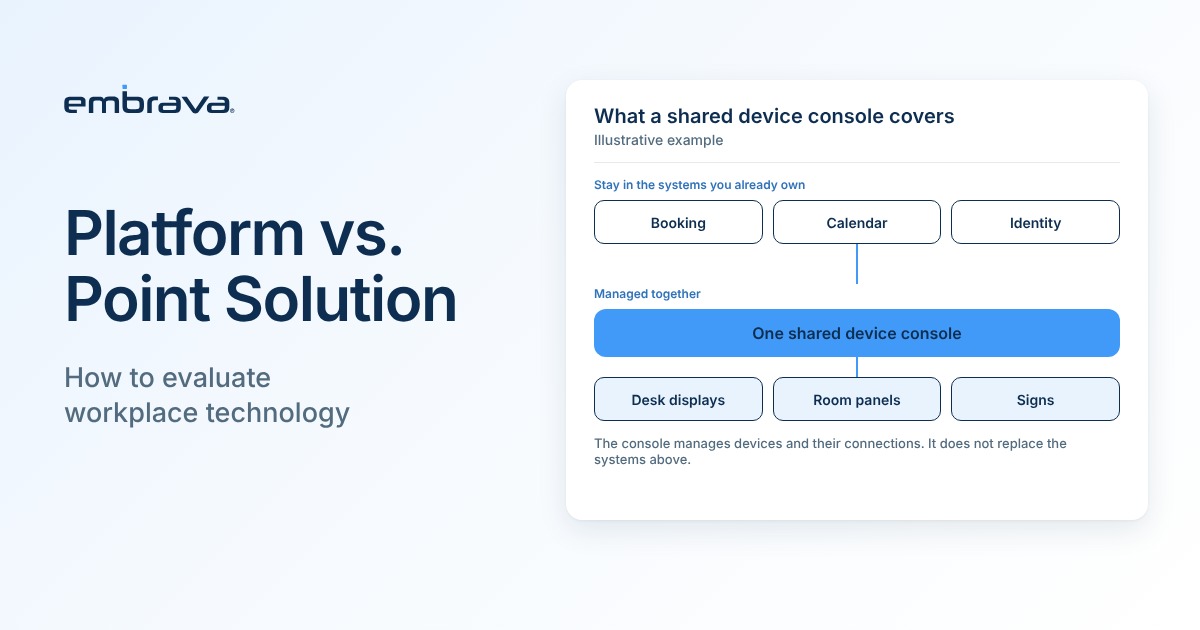
One clarification matters for any buying committee. A shared console for managing devices does not replace the booking application, calendar or identity system you already use. It manages the devices and their connections to those systems.
How does tool sprawl start?
Picture a hybrid office that adds desk booking in the spring. Room panels follow in the summer, because double-booked meeting rooms were the loudest complaint. Digital signage arrives with the lobby refresh. Then someone buys presence lights for the open-plan team that keeps getting interrupted. Each purchase solved a real problem.
By autumn there are four products, four admin screens and four vendors to call when a device drops offline. Some of those products connect to each other and to the booking system. Some do not. Either way, someone now has to keep all of it running, and that weekly work is what the platform versus point solution question is really about.
Illustrative scenario. Not a customer account.
What is the difference between a platform and a point solution?
A point solution is built for one job, such as booking desks, showing room status or running signage. Being single purpose does not make it isolated. Many point solutions connect well to booking, calendar and identity systems, and some do it better than a broader product would.
A platform is a shared layer that several products or devices use. It gives your team one place to configure them, update them, connect them to other systems and see their status. In workplace technology that layer usually involves three things: the devices people see at desks, doors and rooms; the software that manages those devices; and the connections to the systems the organization already runs.
| Handled in a shared device console | Stays in the system you already own |
|---|---|
| Device configuration, such as colors, layouts and settings | Reservations, booking rules and maps in your booking application |
| Software updates and rollouts across devices | Calendars and meeting invitations |
| Device status and where each device is installed | Who a person is, held in your identity or directory system |
| The connections that link devices to your other systems | Your network, power and building access |
When is a point solution the right choice?
Point solutions earn their place in more situations than platform vendors tend to admit. They fit when you need one job done at one site, when a specialist product does something no platform covers, when a small team needs to move quickly, or when you are running a pilot to learn what people will use. They also fit when the tools you already have connect well and one team runs them without strain.
The costs show up later, and they are operational: a second product, a third site, or a new administrator who has to learn each tool from scratch.
How do separate tools and a connected approach compare day to day?
Purchase price is easy to compare. Operating work is harder, and it is where the two approaches differ. Compare them on what your team will do after launch.
| Responsibility | Separate tools | Connected platform | What to check |
|---|---|---|---|
| Deployment | Each product has its own installation steps, network needs and schedule. | One onboarding process for the device types the platform supports. | A written deployment guide and the network requirements. |
| Configuration | Settings are entered tool by tool. Consistency depends on your team. | Settings can be applied by location or device group from one place. | A live change to devices at two sites. |
| Updates | Each vendor schedules its own. You track versions in each tool. | Rollouts and version status are visible together, where the platform offers it. | The update policy, and what happens to a device that misses one. |
| Integrations | Each tool connects to your booking, calendar and identity systems itself. A good point solution may do this very well. | Connections are managed centrally, but each system you use still needs a supported connection. | Named systems in written documentation, and who maintains each connection. |
| Support | Each vendor supports its own product. A problem that crosses two tools needs a coordinator. | One support relationship for the devices the platform manages. Faults in your booking application still go to that vendor. | Support hours, the escalation path, and who owns a fault that crosses vendors. |
| Expansion | A new site or device type often means another evaluation. | Adding a site or a supported device type is mainly configuration. | The steps, time and cost to add one site, and the device types supported today. |
| Exit | Leaving means replacing one tool. | Leaving can affect every device the platform manages. | What can be exported, whether hardware keeps working without the cloud service, and the wind-down terms. |
The exit row counts against platforms, and it should. Consolidation moves risk as well as effort. Ask about it before you sign.
Seven questions to ask any vendor
Whether you are weighing a platform or a point solution, these questions separate a good fit from a good demo.
- How many device types and sites can one person manage from one console? Ask to see it with your own scenario, not a slide.
- How are updates handled? Find out whether updates roll out centrally, who schedules them, and what happens to a device that misses one.
- Which booking, calendar and identity systems does it connect to, and where is that documented? Look for named systems in written documentation. Confirm that connecting one does not change settings in the system you already own.
- What happens when the network drops? Ask what a device shows, and what employees see, until it reconnects.
- Who can see and change what? Check for role-based access and a record of who changed which setting.
- What does it take to add the next site or device type? Ask for the steps, the time and who does the work.
- What happens if we leave? Ask whether your configuration and data can be exported, and whether the hardware keeps working.
What evidence should you ask for during evaluation?
- Written integration documentation that names your booking, calendar and identity systems and the versions supported.
- A walkthrough in the console using your own scenario, for example changing one setting for devices at two sites.
- The update policy and the support terms in writing, including escalation for faults that involve another vendor.
- A reference conversation with a customer of similar size and device mix, focused on running the system rather than buying it.
- A pilot at one site with success measures agreed before it starts.
- Export and exit terms in the contract, including what happens to devices if the cloud service ends.
What does a connected approach look like in practice?
Embrava is one example of the platform approach. Embrava Connect Cloud is Embrava's cloud platform for managing Embrava devices, such as Desk Sign and Room Sign, and their connections to the booking and workplace systems you already use. IT teams can see devices across locations, review their status and manage their configuration from one place.
It does not replace your booking platform, calendar or identity system. The booking platform stays the system of record, and Embrava devices connect to many third-party booking platforms. Ask whether yours is on the list. Devices from other vendors stay in their own tools, so if your estate is mixed, ask how the two will coexist. For one example of a connection, read about Embrava Desk Sign with YAROOMS. If you evaluate Embrava, apply the seven questions and the evidence list above to us as you would to any vendor.
A quick way to decide
| Your situation | Likely fit | Why |
|---|---|---|
| One job, one site, small team | Point solution | Less to set up and less to learn. Ask about an exit path. |
| Two or more device types across several sites | Connected platform, if it manages the devices you plan to buy | Configuration, updates and status live in one place. |
| Several booking systems across regions | Platform with broad, documented integrations | One management view while each location keeps its own booking system. |
| A pilot to test demand | Point solution, with a path to expand | Learn first. Ask in advance what expansion involves. |
| A specialist need no platform covers | Point solution | Fit matters more than consolidation. |
| A mixed estate with other vendors' hardware | Depends on coexistence | Ask how each console handles devices it does not manage. |
Frequently asked questions
Talk with an expert
Bring your list of tools and sites. We will walk through which jobs a shared console would cover and which stay in the systems you already own. Talk with an expert or visit an Experience Center in New York or London.